 Docs
Docs
Quickstart
From nothing to a verified identity on one page, keyless first. You can verify a live /128 against the internet's own root before you install a single thing; the sensor is the optional power-up you add after.
Two tiers, one primitive. The keyless half, verify an identity, resolve a name, read an RDAP record, works for everyone: no agent, no account, no API key. The keyed half, register, govern, revoke, egress, unlocks with your API key. Both halves are on this page, in that order.
1. Verify a live identity, keyless
Before installing anything, point stock tools at a real Whisper identity. Whisper's API is nowhere in the trust decision. The example below is a live identity, the agent scout, that you can run this second:
# reverse DNS names the address - the identity, in public
$ dig -x 2a04:2a01:b69a:6717:e3b0:51ff:3bf7:f478 +short
ae3b051ff3bf7f478.tdc38e7c55bad3306a92b830f9bb1e4f9.agents.whisper.online.

# one keyless call returns the whole evidence bundle
$ curl -s 'https://rdap.whisper.online/verify-identity?ip=2a04:2a01:b69a:6717:e3b0:51ff:3bf7:f478'
{
  "is_whisper_agent": true,
  "fqdn": "ae3b051ff3bf7f478.tdc38e7c55bad3306a92b830f9bb1e4f9.agents.whisper.online",
  "dane_ok": true,
  "jws_ok": true,
  "evidence": {
    "posture": "tier1.5",
    "dane": { "usage": 3, "selector": 1, "matching": 1,
              "profile": "DANE-EE 3 1 1 (DNSSEC-anchored TLSA; no public CA needed)",
              "strong_pin": true, "served_leaf_matches": true },
    "rdap": "https://rdap.whisper.online/ip/2a04:2a01:b69a:6717:e3b0:51ff:3bf7:f478"
  }
}is_whisper_agent, dane_ok and jws_ok all read true, and the DANE pin is 3 1 1, matching the served leaf, with no public CA in the path. That is the whole first tier: a routable address that is an identity, checkable by a stranger. For the full chain (DNSSEC signatures re-derived with delv, RRSIG PTR alg 13, forward-confirmed AAAA, the TLSA record, the RDAP object) see Install & verify and the deeper /128 identity page.
2. Install the CLI, one command
The identity above needs no agent. The same one command installs the CLI everywhere, and run plainly it does exactly one thing:
$ curl -fsSL https://get.whisper.online | sh
whisper: installing…
whisper: installed ✓  (run: whisper)
whisper: installed to /usr/local/bin/whisper - run: whisper
That is a signed, checksum-verified binary on PATH, nothing else. Minting an identity and turning on the sensor are each a separate, deliberate opt-in next, never a side effect of piping a script off the internet.
3. Add a key: it mints your /128, and, one flag further, the sensor
Put your API key on the request and the same command also mints the host's own routable /128, because now there is a key to mint it with:
$ curl -H "X-API-Key: whisper_live_...redacted" https://get.whisper.online | shThe install itself never depends on the key being any good. Here is that exact command against a deliberately wrong key, captured verbatim:
whisper: installing…
whisper: installed ✓  (run: whisper)
whisper: couldn't bind a /128 identity (key refused or control plane unreachable) - whisper is installed; bind later with: whisper create --name {host}
whisper: installed to /usr/local/bin/whisper - run: whisper
A real key replaces that third line with whisper: bound <address> (<name>). That address comes out of 2a04:2a01::/32, announced by AS219419: DNSSEC-anchored reverse DNS, a DANE-EE key pin, a public RDAP registration. It is not a token you rent and it is not an opaque sensor GUID; it is an internet identity anyone can look up. Run the same two commands from step 1 against your new address and watch your own host verify.
Add WHISPER_SENSOR=1 to the same command and, once the /128 is in place, it also installs and starts the calm sensor:
$ curl -H "X-API-Key: whisper_live_...redacted" https://get.whisper.online | WHISPER_SENSOR=1 sh
whisper: installed ✓  (run: whisper)
whisper: bound 2a04:2a01:f804:fd8:4b5b:1a4b:4885:9c9c  (a4b5b1a4b48859c9c.td68f56a48850edbd42b1dcd97f680e8d.agents.whisper.online)
whisper: sensor service installed + running (whisper-sensor)
That is the whole Linux install: one command, three lines back, and the host is enrolled, identified and observed. Confirm it with systemctl status whisper-sensor.
If an earlier attempt got partway — the CLI installed but no sensor, which is what the bare one-liner leaves — run exactly the line above. whisper enroll is idempotent, so it re-finds the /128 this host already has instead of minting a second one, and then adds the sensor. There is nothing to clean up first.
What that one flag turns on: four telemetry streams, twelve behavioral detection engines plus real Sigma and YARA-X rule engines, and process-to-DNS attribution, all observe-first, running under a kernel-enforced cgroup ceiling it stays well inside, and it fails open, so the host keeps resolving and running even if the sensor goes quiet. Full detail, per-distro, every flag and the measured footprint, is in Install & verify.
4. Give an AI agent a /128 (with a key)
The second tier is the control plane. With your API key, one call over the public control endpoint registers an agent and hands back a routable /128, so a spawned agent gets a real identity, a reverse-DNS attribution and an off-host kill-switch in a single request:
$ curl -s -X POST https://graph.whisper.online/api/query \
    -H 'content-type: application/json' \
    -H 'X-API-Key: whisper_live_...redacted' \
    -d '{"query":"CALL whisper.agents({op:\"register\", name:\"scout\"})"}'
The identity it returns is a public object exactly like the one in step 1: dig -x it, or open its RDAP record. To govern the fleet, the same verb carries op:list, op:logs, op:policy and op:revoke, and the policy surface runs deep: a per-agent egress firewall consulted on every CONNECT in our egress plane, per-device policy (the same verb with a device selector), and nested sub-agents that each get their own governed /128, where revoking or kill-switching the parent cuts the whole subtree. All of it is enforced off-host, against the address, so a compromised agent cannot disable its own governance. See Fleet, logs & console for the policy surface and Containment for revoke and the on-host respond tier.
Two tiers, by design. The keyless half (verify an identity, resolve a name, read an RDAP record) works for everyone with no account, so there is real value before you sign up. The keyed half (register, govern, revoke, egress) unlocks with your API key. Keep the key server-side; it never belongs in a browser or a captured transcript, which is why every example here shows it redacted.
5. Watch it land
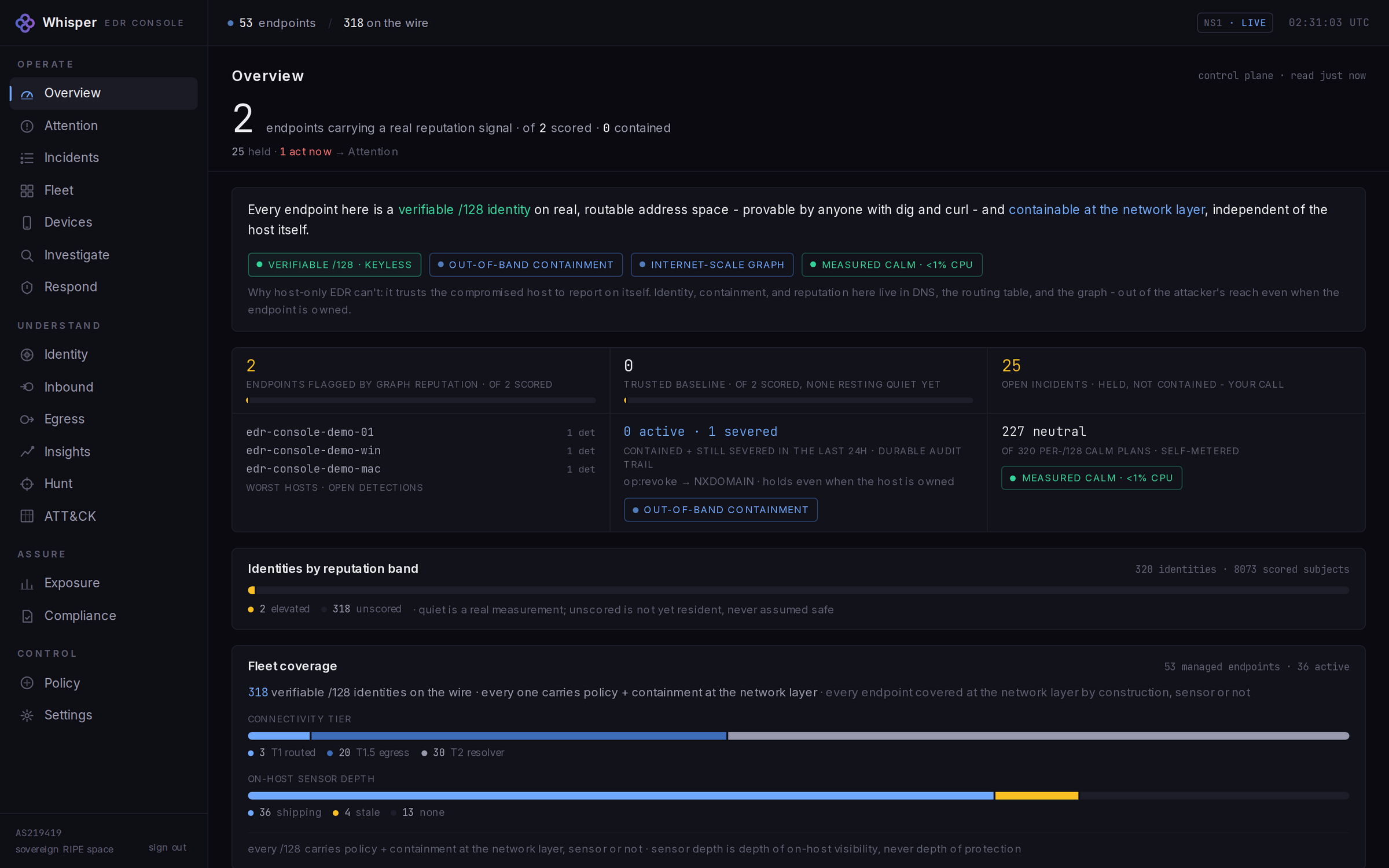
Once the sensor is up, the host and its verified /128 appear in the operator console alongside the rest of the fleet. The screen below is a live capture reading real wire data on our lab fleet, not a mockup: